 Retirement Planner Guide
How a plan works
A plan in Retirement Planner is a year-by-year projection, from the client’s age today to the age you plan to. Each year it adds up every income source, works out the tax, compares what is left with the budget, and tracks what the client owns. This chapter explains the few ideas the rest of the guide relies on.
Clients and strategies
A client holds the facts about a person: birthdate, province, balances, pensions, property and debts. A strategy holds the choices: when to retire, when to take CPP and OAS, how much to draw from each account, and the budget. A client can have several strategies, so you can compare choices on the same facts. Couples are two clients linked as spouses; see Spouses and partners.
The ages that matter
| Age | Where it is set | What it does |
|---|---|---|
| Current age | Worked out from the Birthdate in the client’s profile | The first year of every projection. Amounts in today’s dollars are inflated from this age. |
| Start age | Start age: in the strategy’s settings bar | The year retirement begins. Budget years and plan status count from here. |
| Go-go end and slow-go end | Go-go end: and Slow-go end: in the settings bar | Split retirement into three phases (below). Withdrawal rates can differ by phase. |
| Planning age | Expected age: in the client’s profile | The last year of the projection. It is a planning horizon, not a forecast; 90 to 95 is common. |
| Benefit start ages | The CPP, OAS and GIS tabs, and the client’s pensions | When each benefit or pension starts to pay. |
Go-go, slow-go and no-go years
Spending usually changes as retirement goes on: busy, travel-heavy early years, a calmer middle, and quieter late years. Retirement Planner calls these the go-go, slow-go and no-go years.
- Go-go years run until the Go-go end age (75 by default).
- Slow-go years start at that age and run until the Slow-go end age (85 by default).
- No-go years start at the slow-go end age and run to the planning age.
The RRSP, TFSA, business and investment tabs each take a withdrawal rate or amount for every phase. Charts colour the years by phase, and the phase ages are shown in orange on the age axis.
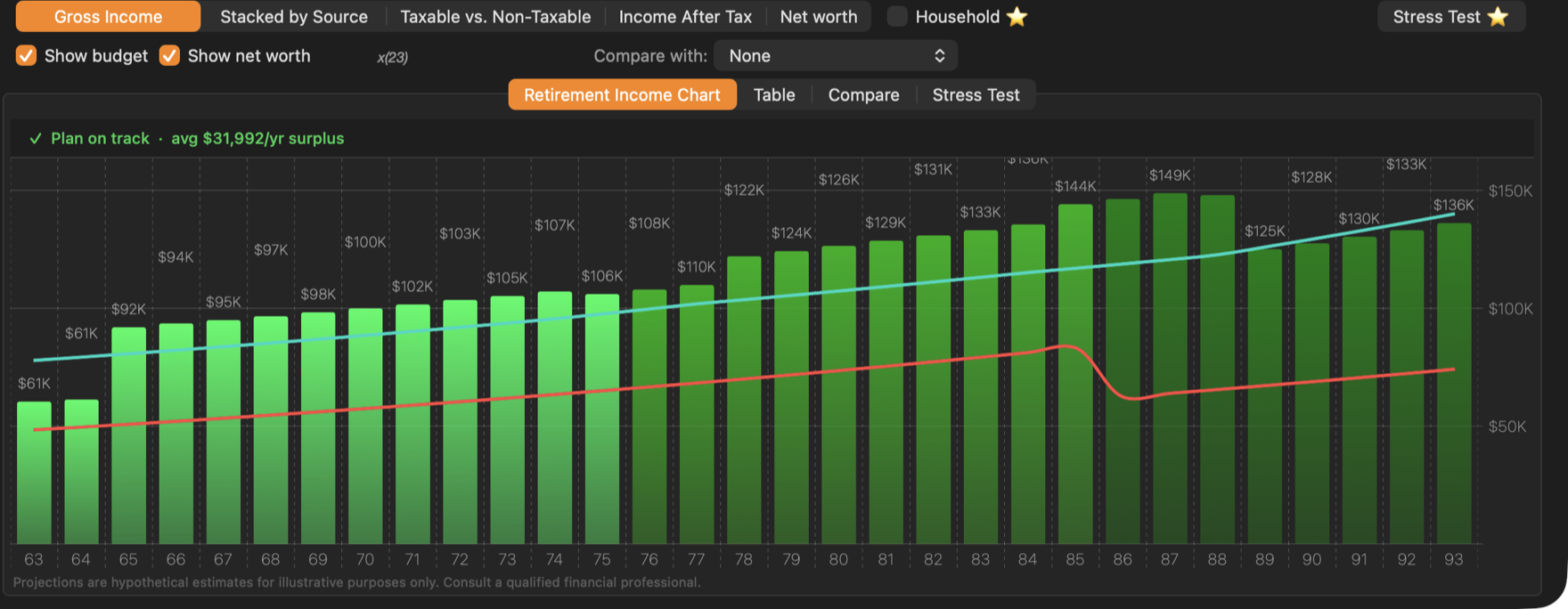
The budget does not change by phase on its own. Give budget entries an age range instead, for example travel from 63 to 75 and a smaller travel amount from 76 to 85. See Budget.
Inflation and today’s dollars
With Inflation ticked in the settings bar (2.5% a year unless you change it), the projection is in the dollars of each future year:
- Budget amounts and fixed withdrawal amounts are entered in today’s dollars and grow with inflation every year.
- CPP, OAS and GIS rise with inflation, as they do in real life, and tax brackets are indexed the same way.
- Pensions, annuities and other income grow only when their Indexed by inflation box is ticked in the client’s profile.
Untick Inflation to see the projection in today’s dollars. Pensions, annuities and other income marked Indexed by inflation still rise each year.
Investment returns
Investment appreciation in the settings bar holds two rates: one for stocks and one for bonds and cash. Each account grows at a blend of the two, using the stock percentage set for that account in the client’s profile. For example, with stocks at 6.5%, bonds at 3% and an RRSP that is 60% stocks, the RRSP grows at 5.1% a year. Untick Investment appreciation to project with no growth. Property grows at its own rate, set on the Real estate tab.
Gross income, tax and income after tax
Each year, the income from every source is added up as gross income. The part that is taxable — everything except TFSA withdrawals, GIS and the non-taxable part of investment withdrawals — goes through the federal and provincial tax calculation for the client’s province, with the age amount, the pension income amount, dividend credits and the OAS recovery tax. What is left is income after tax, the money there is to spend. See How taxes are estimated.
Is the plan on track?
If the strategy has a budget, each retirement year’s income after tax is compared with that year’s budget. The line above the income chart sums it up: Plan on track when every year is covered, or the first age at which the plan runs short. Small gaps — under 1% of the year’s budget, or $50 — are not counted; you can change that in Preferences.
Net worth
Net worth is everything the client owns — RRSP or RRIF, TFSA, business and investment accounts, and property — minus debts, at the end of each year. Withdrawals reduce it, growth adds to it, and selling a property moves its value into the investment account.
What a plan does not include
- Salary and other employment income before retirement. The projection shows retirement income; years before the start age show only what the client draws from their savings and benefits.
- Government benefits other than CPP or QPP, OAS and GIS.
- The exact timing of payments within a year: every amount is treated as one annual figure.
Projections are estimates. Real returns, inflation, tax rules and benefit amounts will differ. Use the stress test to see how the plan holds up when markets do better or worse than expected.