Français

Made in Canada · macOS 14 Sonoma or later

Your Canadian retirement,
clearly mapped.

See whether your income will last — year by year. Model CPP, OAS, GIS, RRSP/RRIF, TFSA, pensions and taxes in one Mac app, then compare strategies and stress-test the outcome.

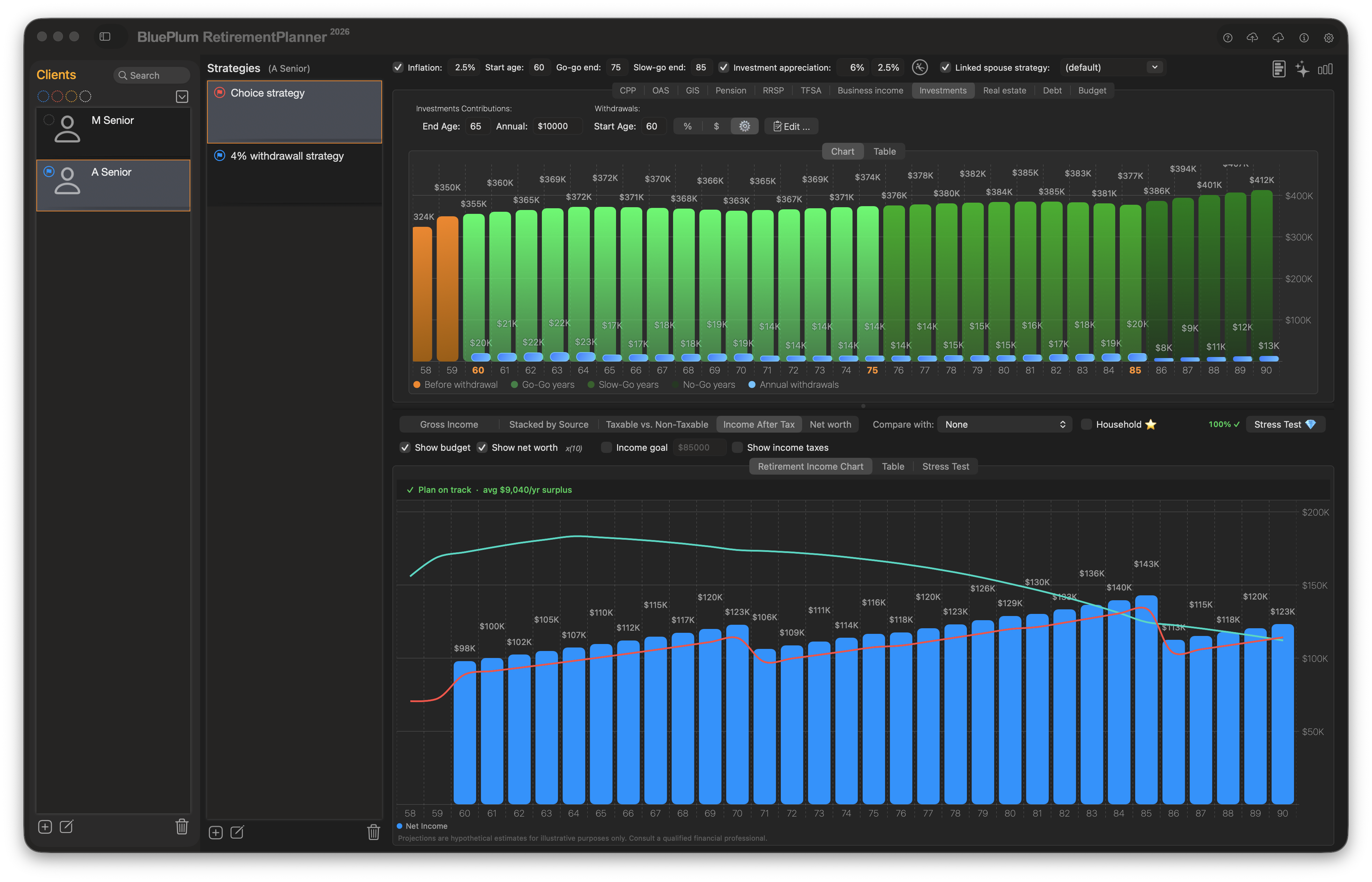
Retirement Planner for Mac showing a year-by-year Canadian retirement income projection chart with CPP, OAS, RRSP and pension sources

Retirement Planner is a macOS app for Canadian retirement income planning. It projects CPP, OAS, GIS, RRSP/RRIF, TFSA, pensions, investments, and real estate year by year, applies 2025 Canadian federal and provincial taxes, and shows your after-tax income and net worth at every age. Compare multiple strategies side by side, optimize withdrawals to hit a target budget, and stress-test the plan with Monte Carlo simulation. Built for Canadians and Canadian financial advisors; requires macOS 14 Sonoma or later.

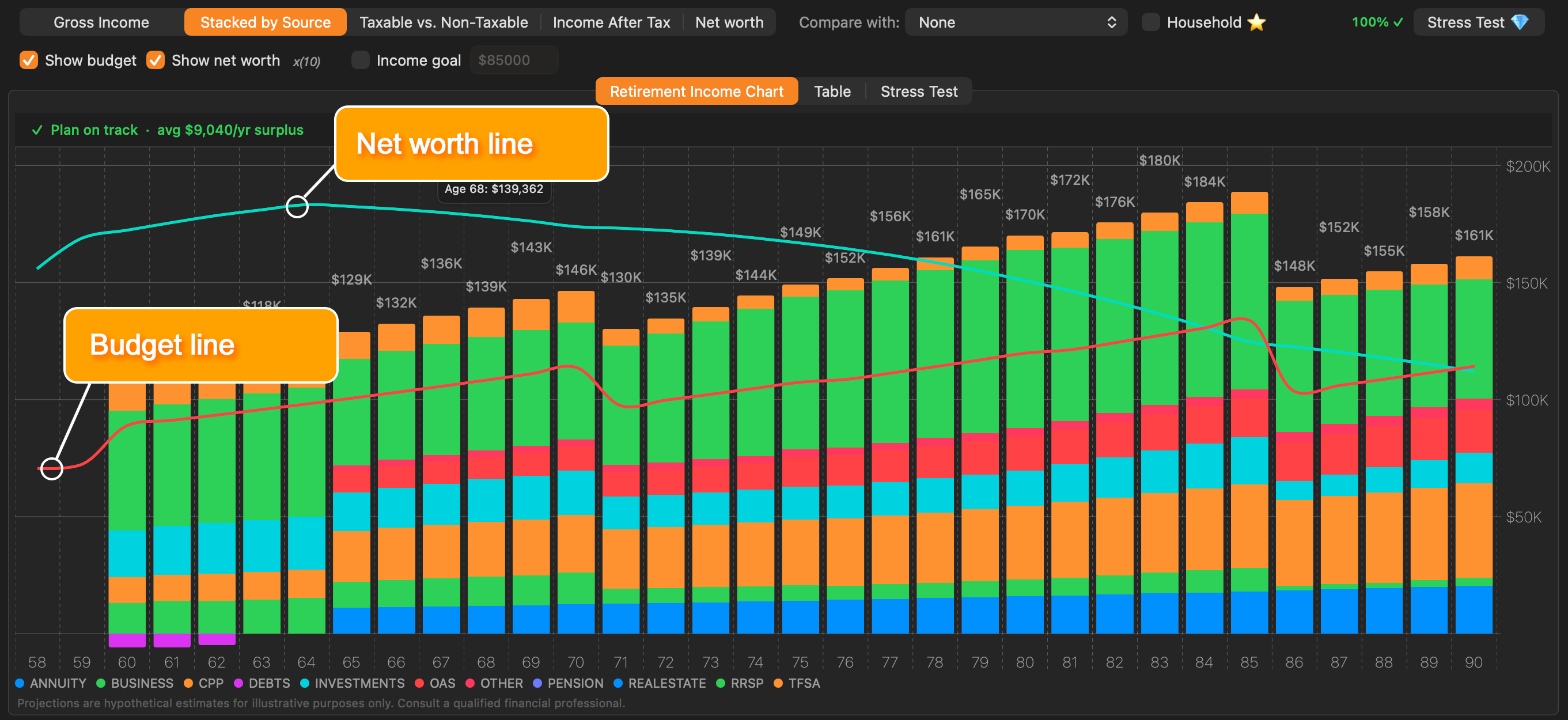
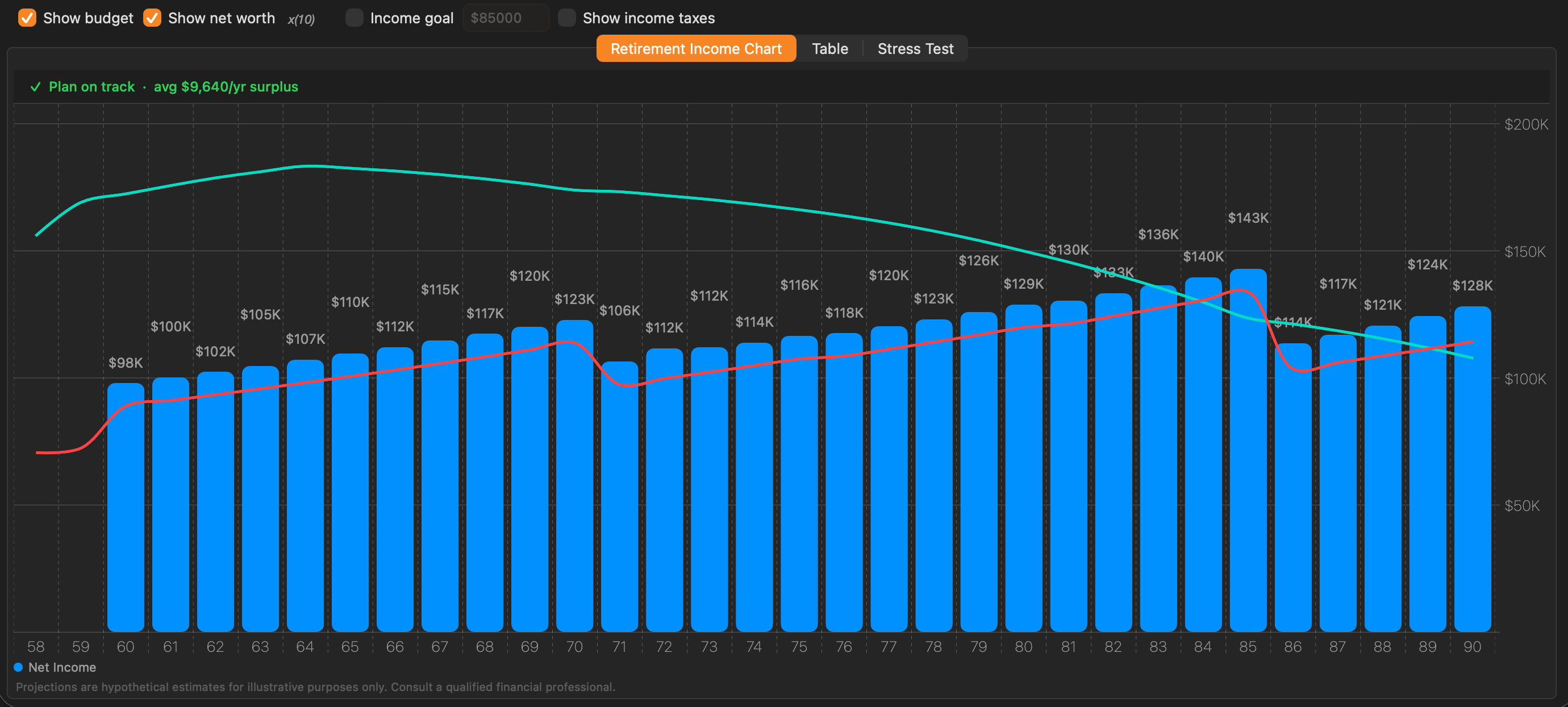
Retirement income chart with yearly bars, budget line, and net worth overlay

See Every Dollar, Every Year

Enter your income sources once and the chart updates instantly — no recalculate button. Each bar represents one year of projected income, labelled with exact dollar amounts. Hover over any bar for a detailed tooltip. A budget line overlays the chart so you can see at a glance whether projected income covers your spending target in every year. A net worth overlay shows total assets on the same axis — income trajectory and portfolio longevity, both visible together.

Five views of your retirement

Switch between chart types instantly — every view recalculates in real time.

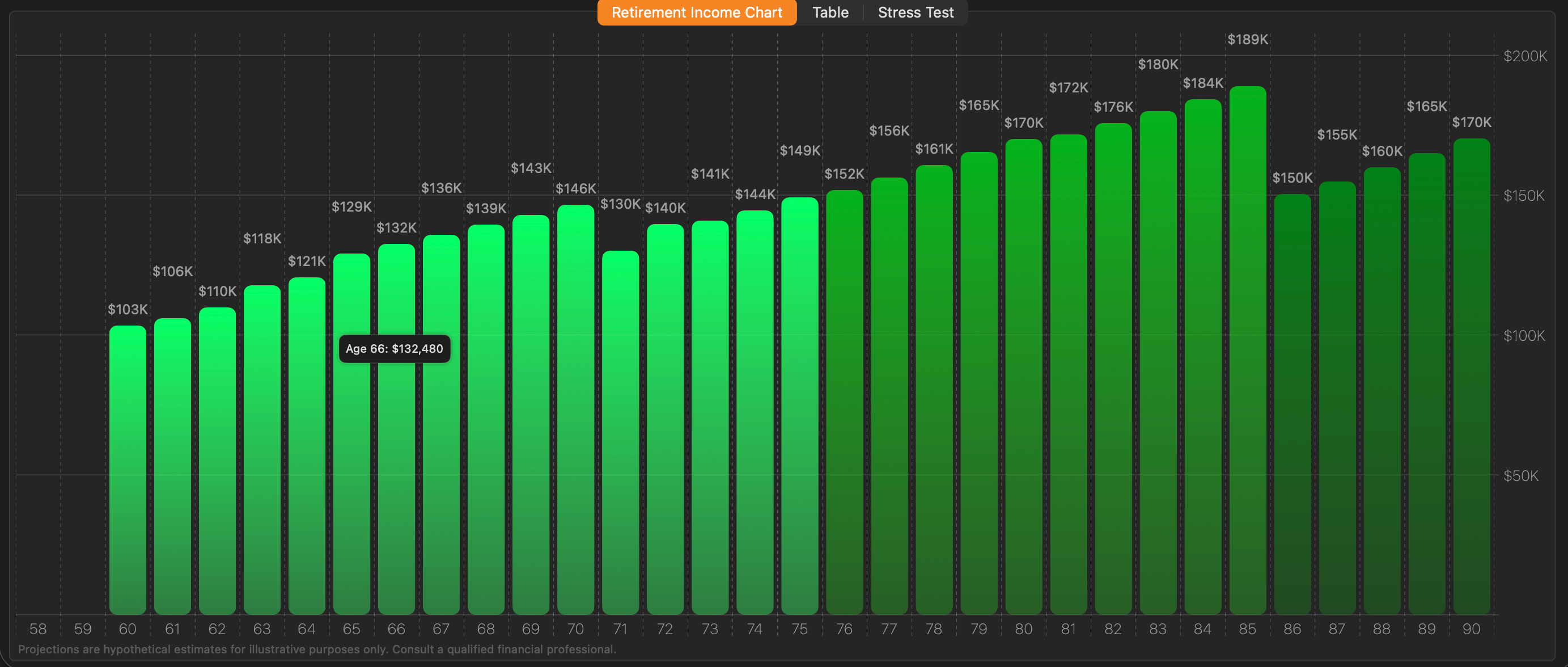
Gross Income chart
Gross Income
Total projected income before tax, year by year.
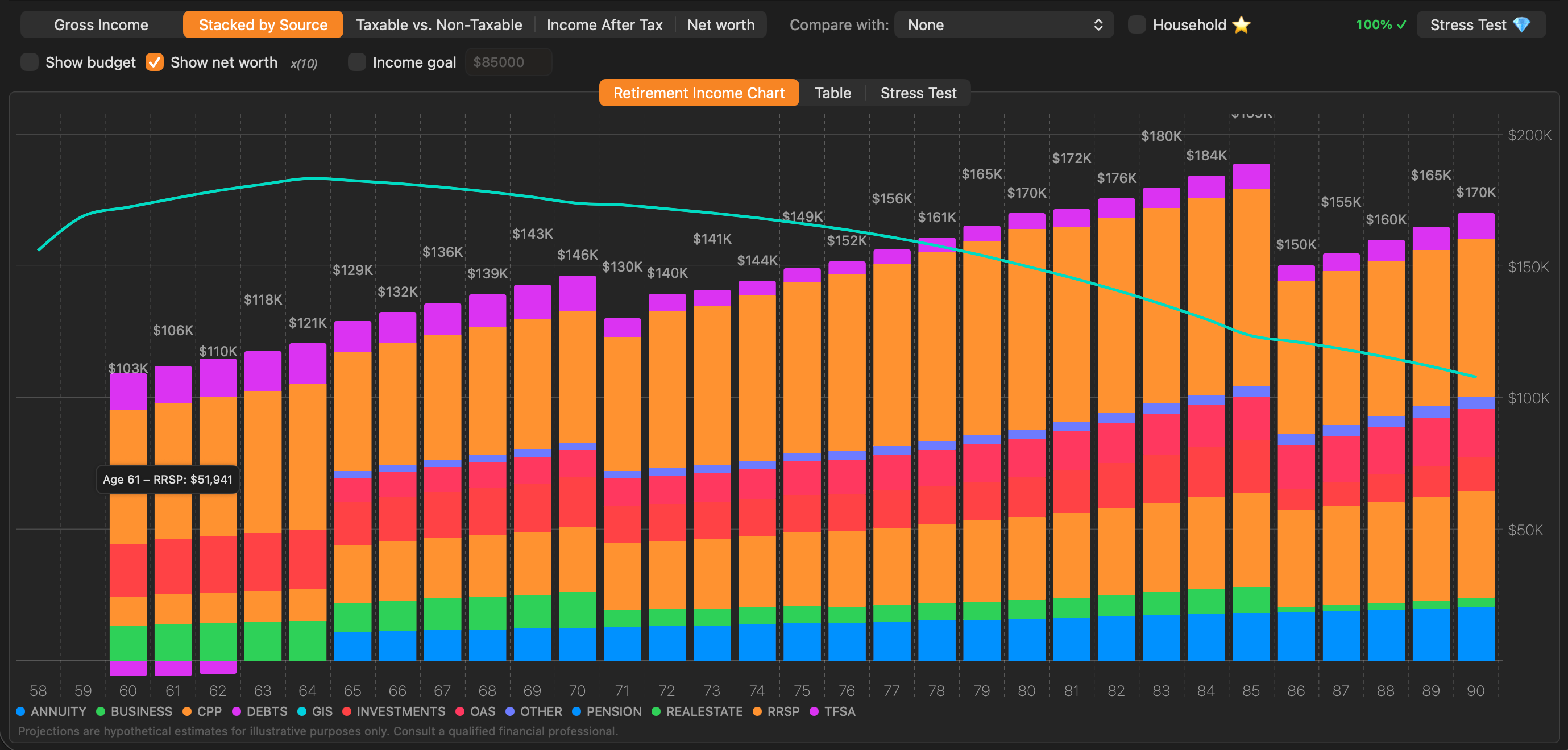
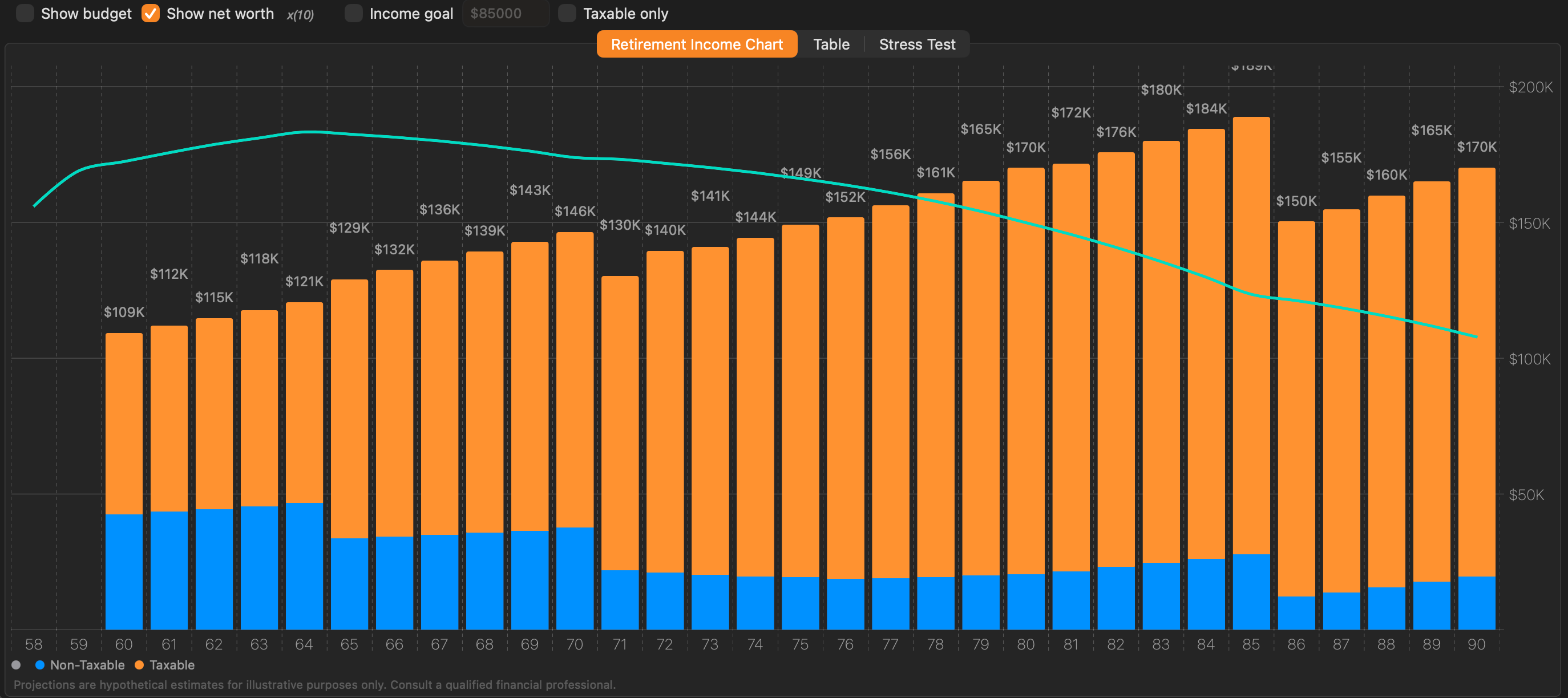
Stacked by Source chart
Stacked by Source
Each income source colour-coded in its own band.
Taxable vs Non-Taxable
Taxable vs. Non-Taxable
See what portion of income faces tax each year.
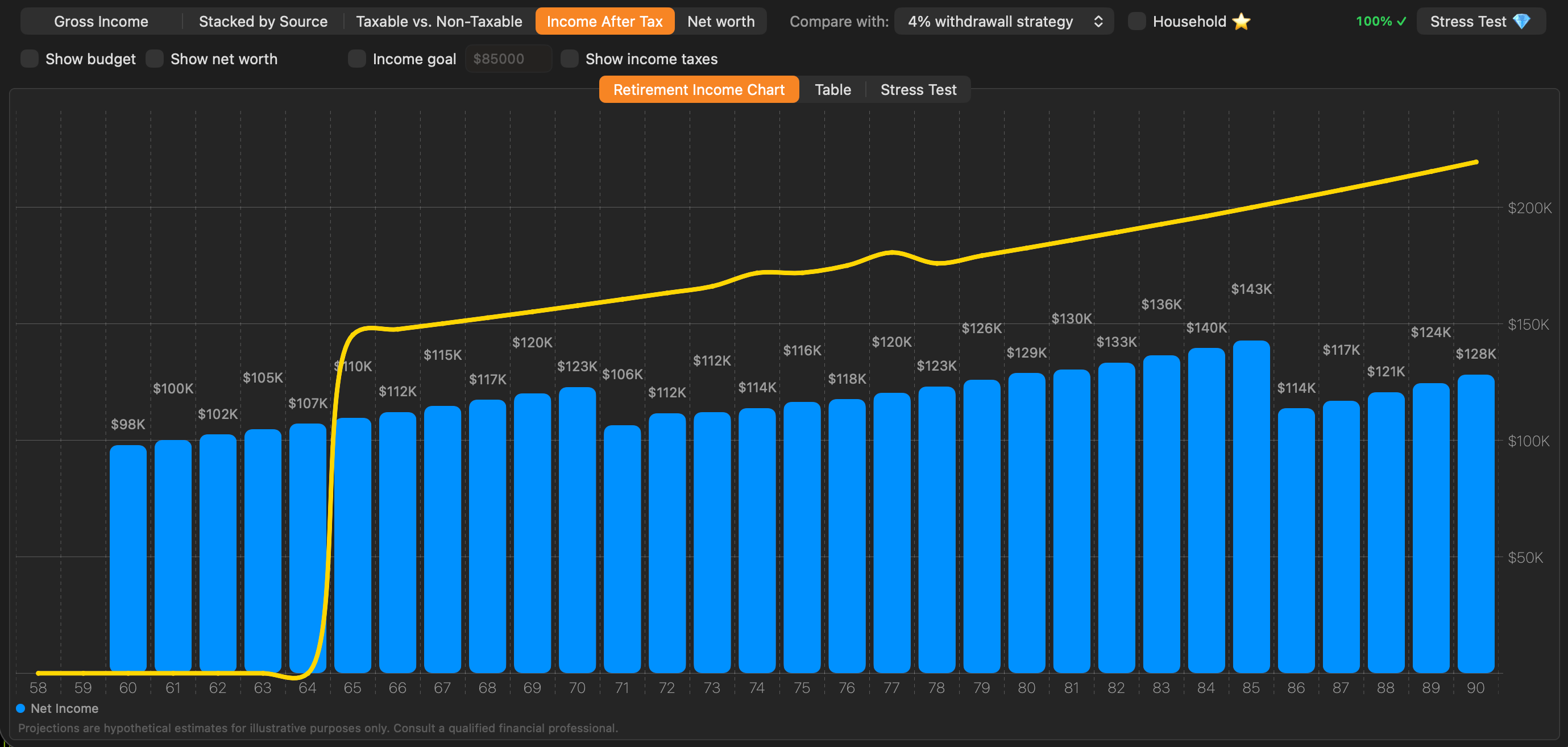
Income After Tax chart
Income After Tax
Real spending power after the CRA takes its share.
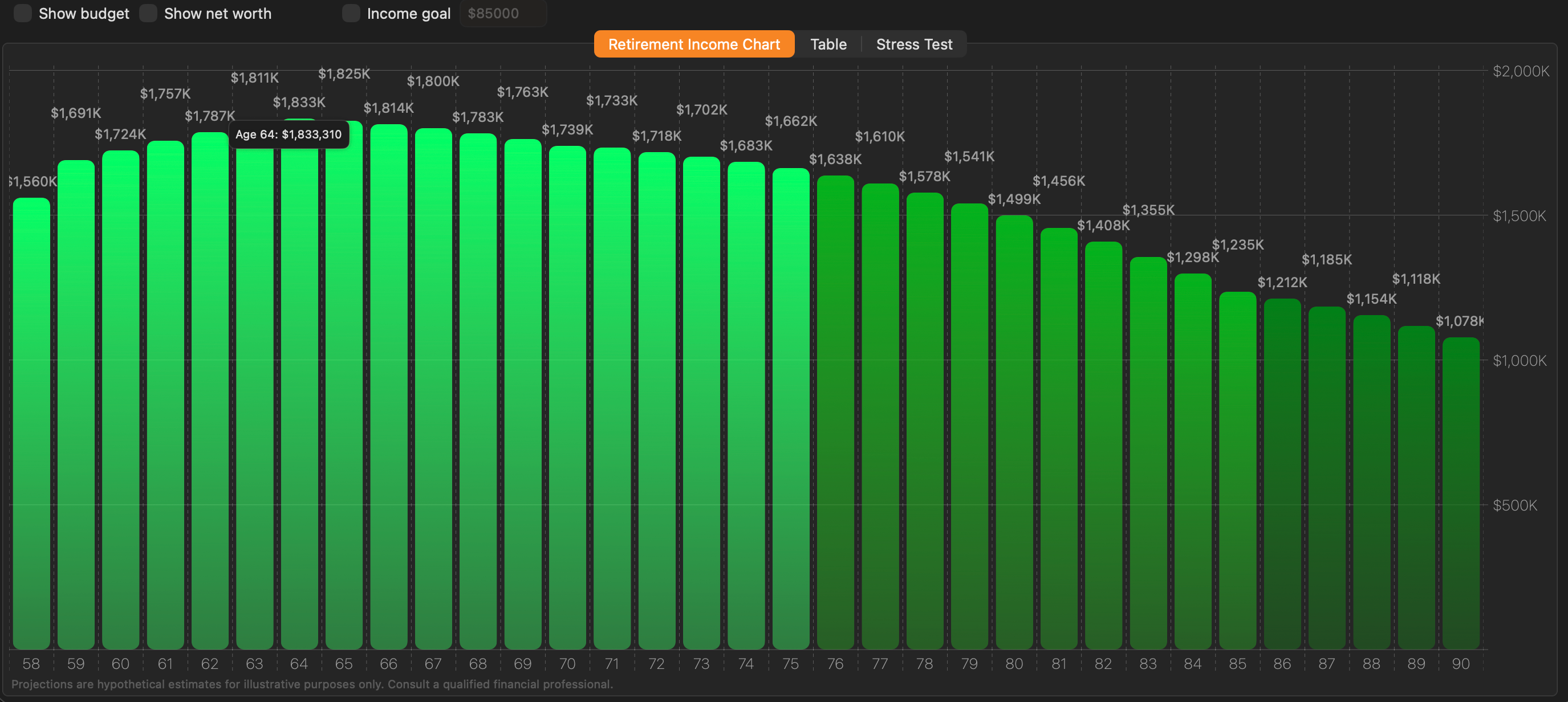
Net Worth chart
Net Worth
Total projected net worth at every age.
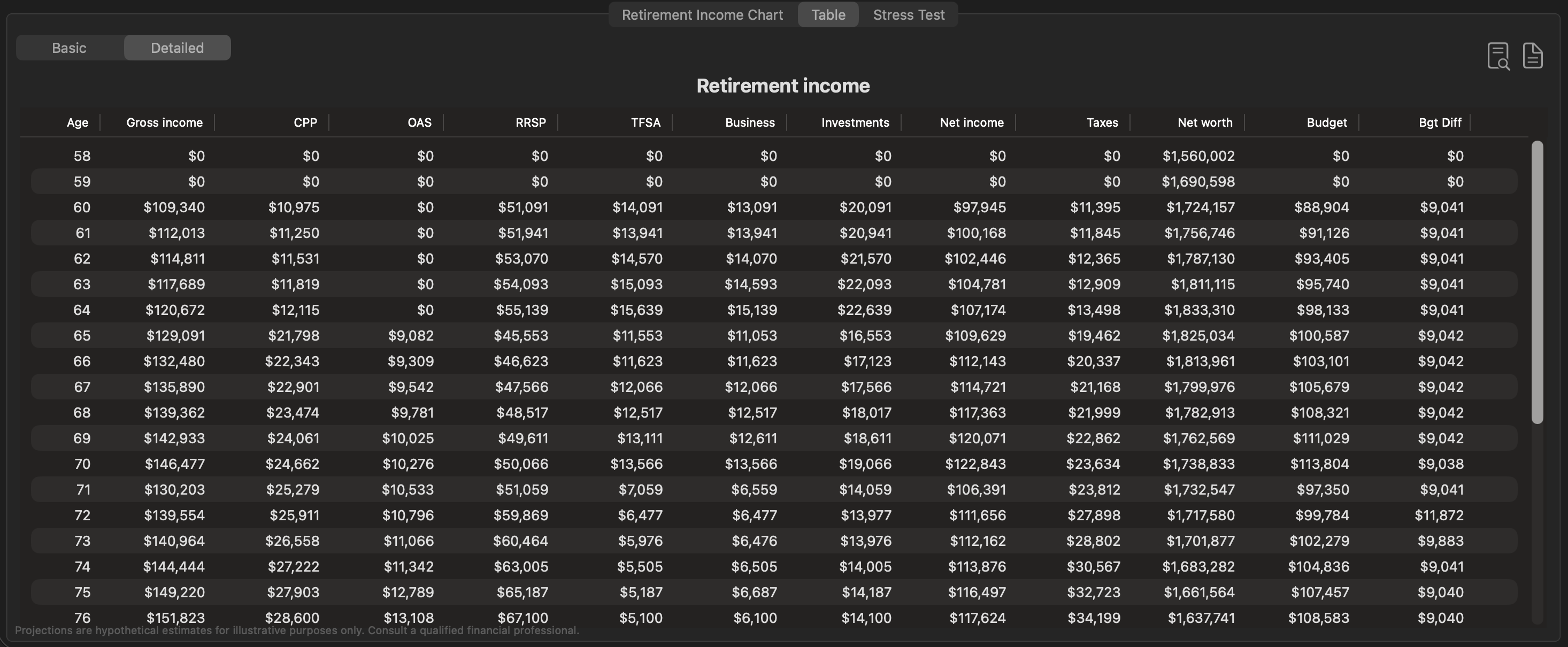
Table view
Table View
Exact numbers, year by year. Export to CSV, create PDF report.
Income after tax — Canadian tax calculation

Built Around the Canadian Tax System

Most retirement tools treat Canadian users as an afterthought. Retirement Planner models the full Canadian tax picture — built for Canada from the ground up:
  • Federal and all provincial income tax brackets
  • Age Amount and Pension Income credits applied automatically
  • OAS Recovery Tax (clawback) computed year-by-year
  • GIS means-tested against projected income each year
  • CPP enhancement (CPP2) modelled separately from base CPP
  • Provincial surtaxes and health premiums, such as Ontario's
  • Tax parameters fetched automatically — always current
Income source tabs for CPP, OAS, GIS, RRSP/RRIF, TFSA, pensions, investments, real estate, and debt

Everything in One Retirement Model

Plan your Canadian retirement in one workspace. Income, tax, spending, investments, real estate, debt, and net worth all update together so the plan stays connected.
  • CPP, OAS, GIS, RRSP/RRIF, TFSA, pensions, business income, investments, real estate, and debt
  • Gross income, after-tax cash flow, net worth, taxable income, and detailed table views
  • Individual and household planning, with spouse strategies linked when needed
Strategy comparison overlay

Compare Decisions Before You Make Them

Create named strategies and compare them on the same chart. Test the choices that actually change retirement outcomes:
  • CPP start age, including early and deferred benefit trade-offs
  • RRSP/RRIF drawdown timing, mandatory minimums, and budget-matched withdrawals
  • Retirement age, spending phases, household plans, and alternate client scenarios
Use automatic withdrawal tools to align after-tax income to the budget, drain net worth by the plan end age, or generate an AI-assisted withdrawal sequence for review.
CPP strategy tab comparing early versus deferred CPP start ages with break-even overlay

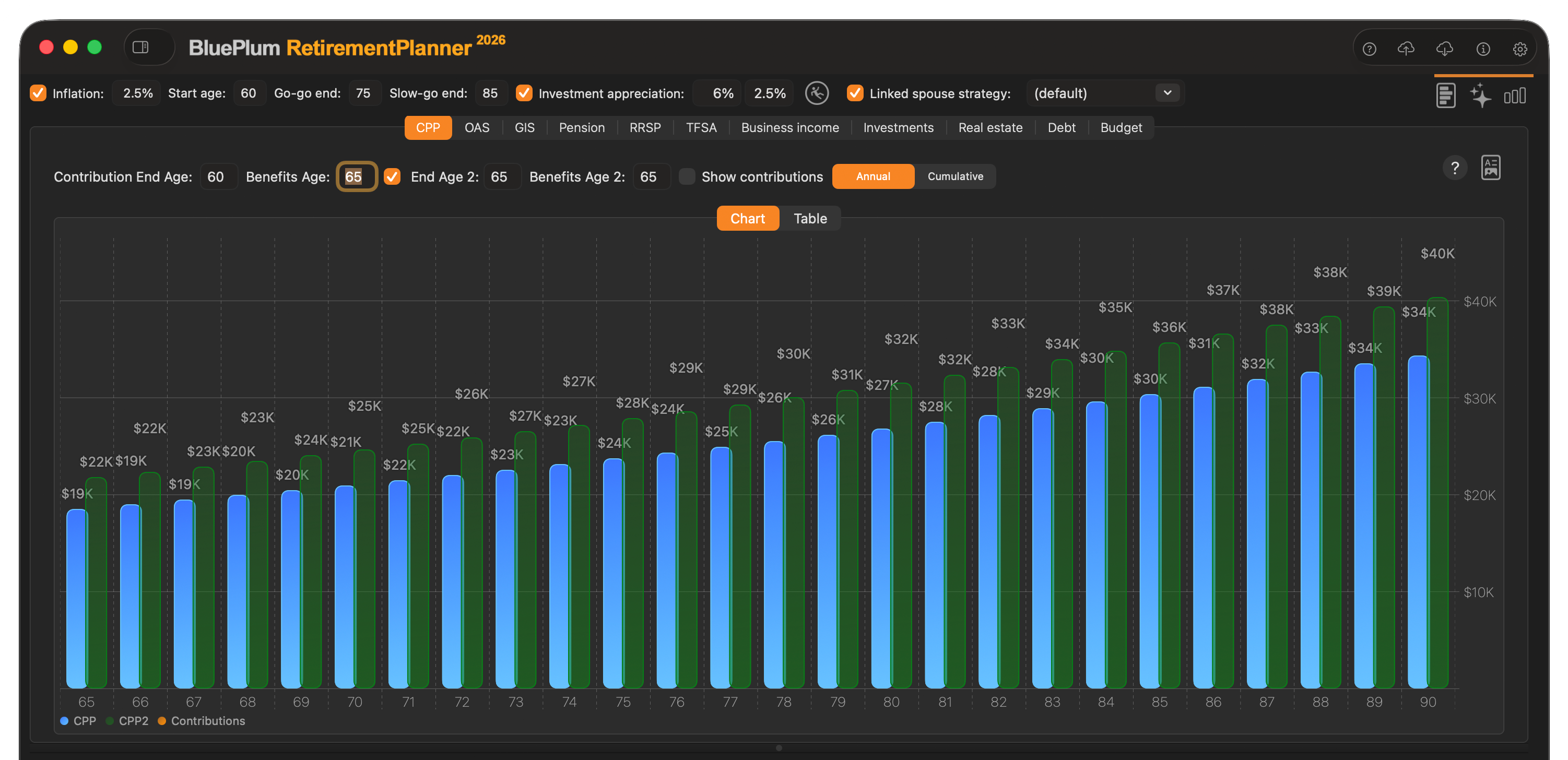
Deep CPP Modelling

Enter your (or your client's) actual year-by-year CPP contributions from the My Service Canada statement, or use the simplified maximum-contribution estimate when the exact history is unavailable. Set the CPP start age anywhere from 60 to 70 — early reduces the benefit, deferring to 70 increases it by 42%. Enable a second start-age scenario to compare both options on the same chart. CPP enhancement (the post-2019 CPP2 component) is modelled separately. A cumulative total overlay shows the break-even age between early and deferred CPP so the trade-off is immediately visible.

RRSP/RRIF strategy tab showing balance projection and three-phase withdrawal settings

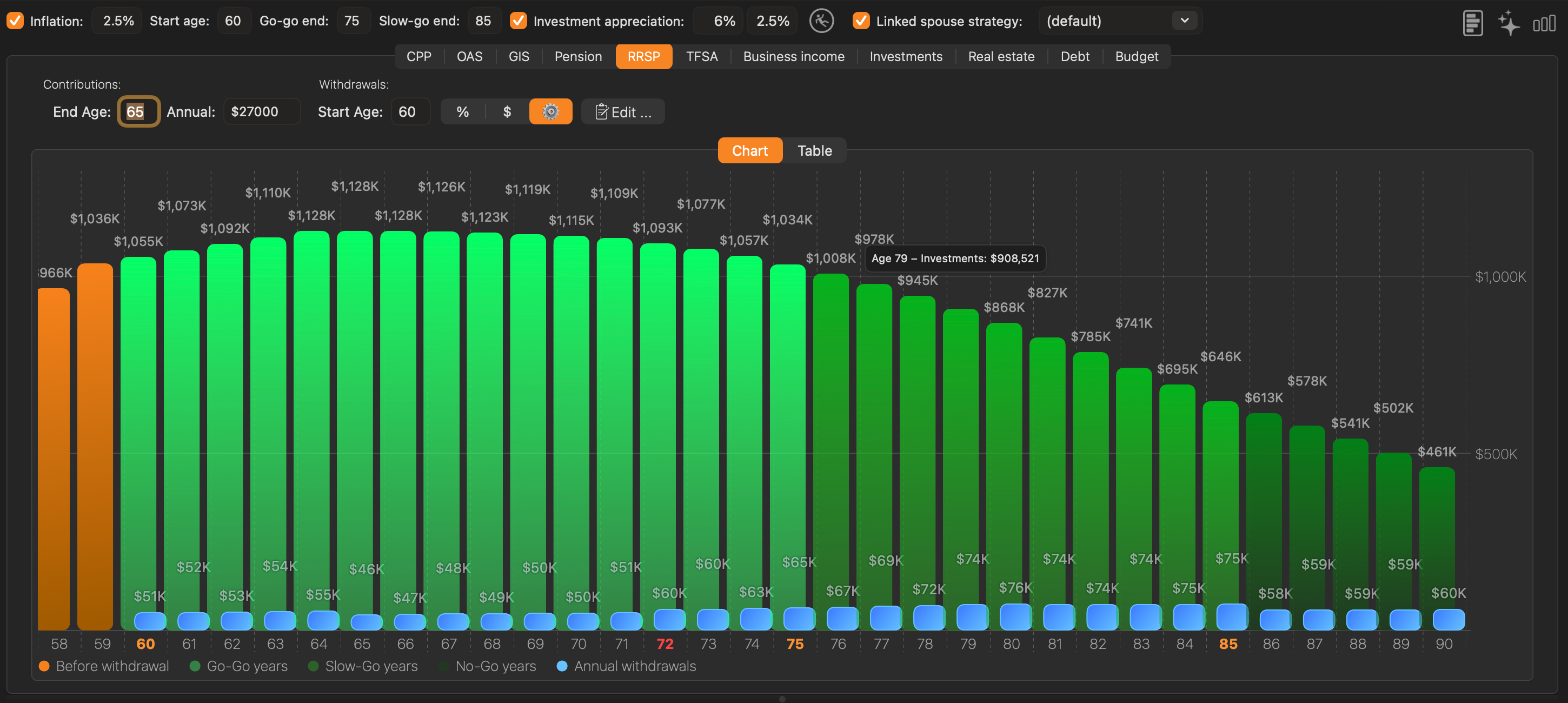
RRSP / RRIF with Three-Phase Withdrawals

Enter the current RRSP balance and the app handles the rest — automatic RRIF conversion at age 71 with mandatory minimum withdrawals. Annual voluntary withdrawals can be set independently for the Go-Go, Slow-Go, and No-Go phases, mirroring the real-world pattern of higher discretionary spending in early retirement that tapers with age. RRSP / RRIF withdrawals are fully taxable and interact with OAS clawback and GIS eligibility — the tax engine accounts for all of these simultaneously. The chart shows balance bars and annual withdrawal amounts as an overlay.

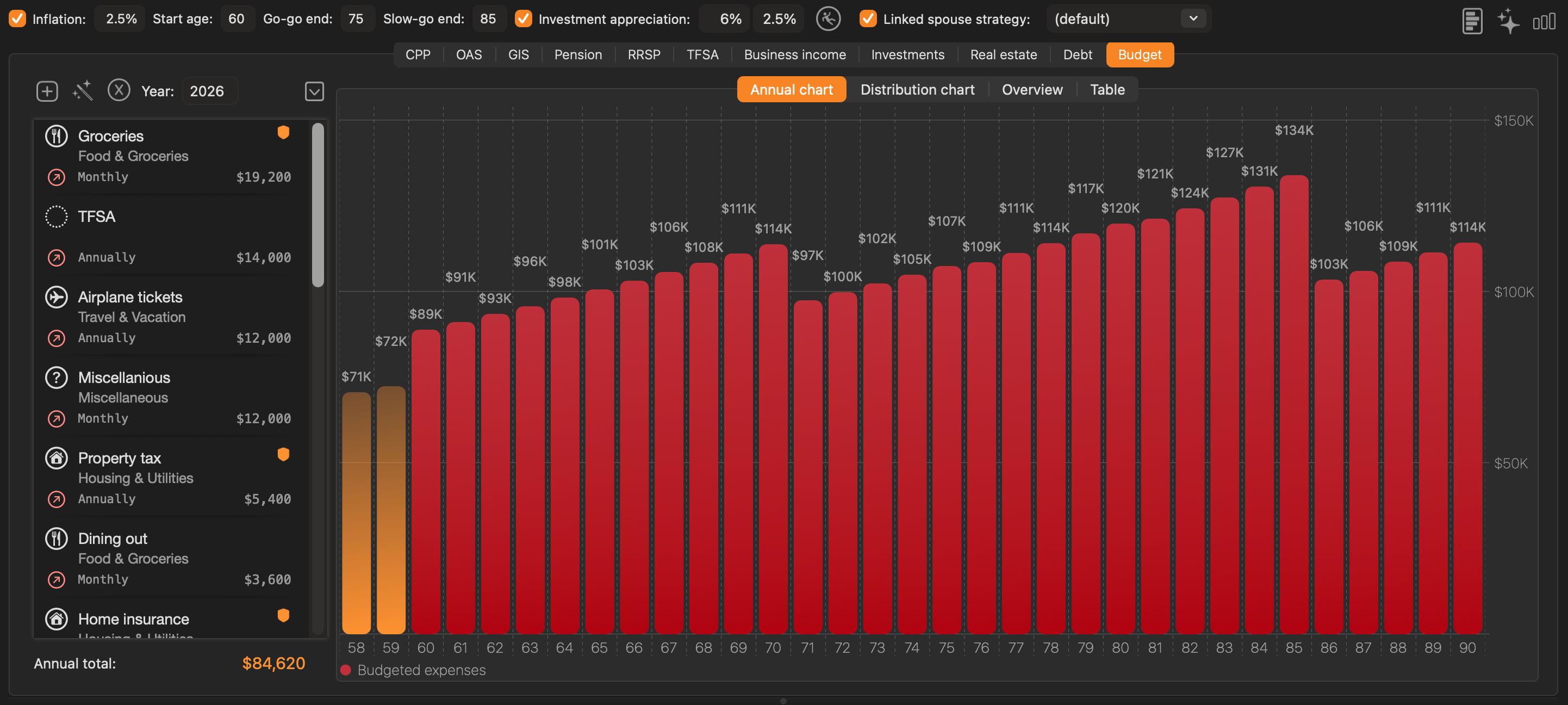
Budget tab with retirement phases

Go-Go, Slow-Go, No-Go Budget Planning

Retirement spending is not uniform. The Budget tab lets you model the three phases that research consistently identifies — high discretionary spending in Go-Go years (travel, hobbies), moderate in Slow-Go, and primarily essential in No-Go years. Set separate essential and discretionary amounts for each phase with inflation adjustment built in. Enable the budget line on the income chart and a status banner turns green when income covers spending in every year — and orange when a shortfall exists, identifying precisely which years need adjustment.

Monte Carlo stress test fan chart

Stress-Test and Present the Plan

Move from projection to presentation with advisor-grade analysis tools:
  • Monte Carlo stress tests with success-rate and percentile views
  • Household mode with pension income splitting for couples
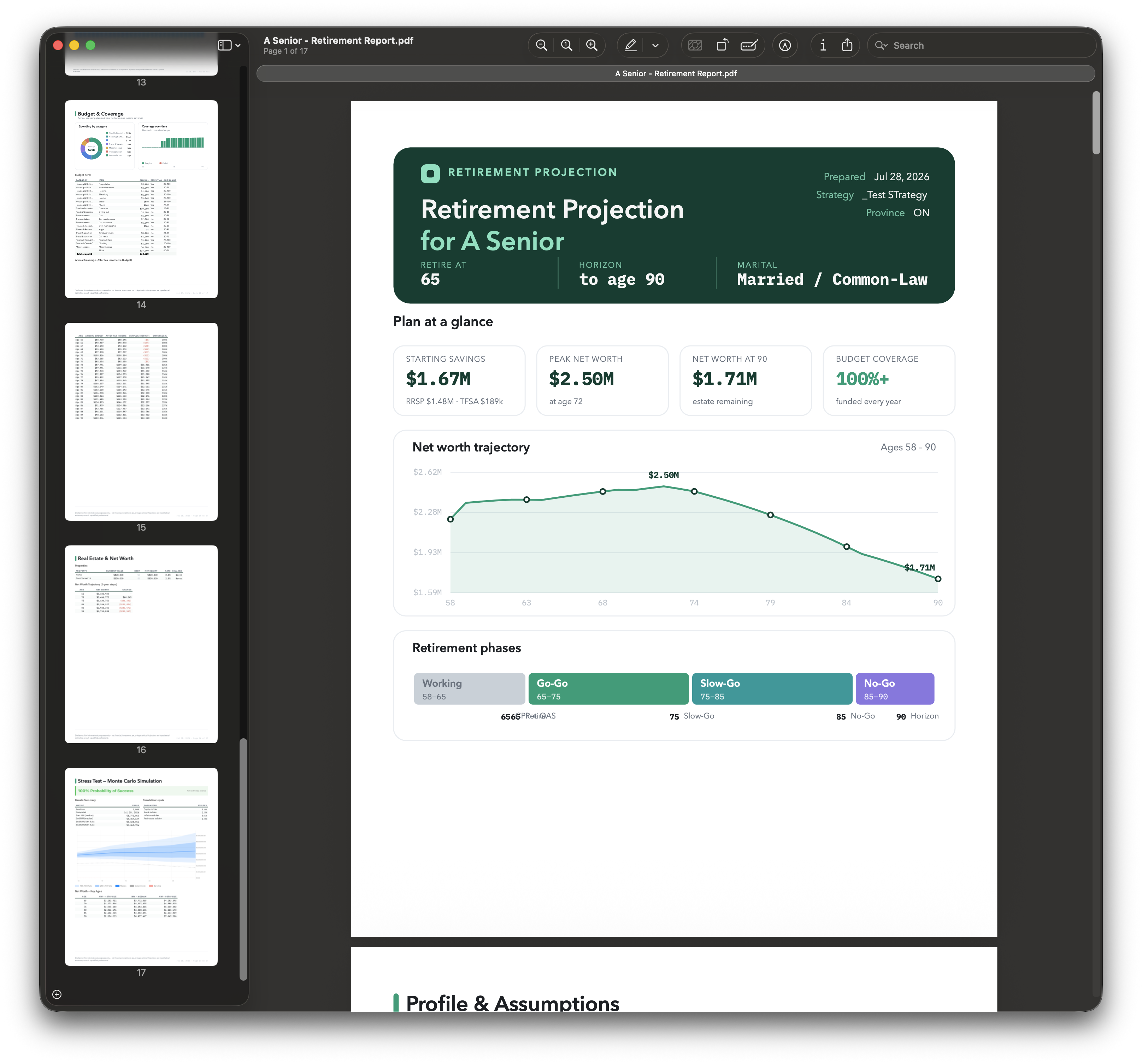
  • Year-by-year tables, CSV export, and polished PDF reports
  • Optional AI planning that sends only the financial inputs needed for analysis

The complete toolkit

Everything the app does, grouped by what you're planning.

Clients & Strategies

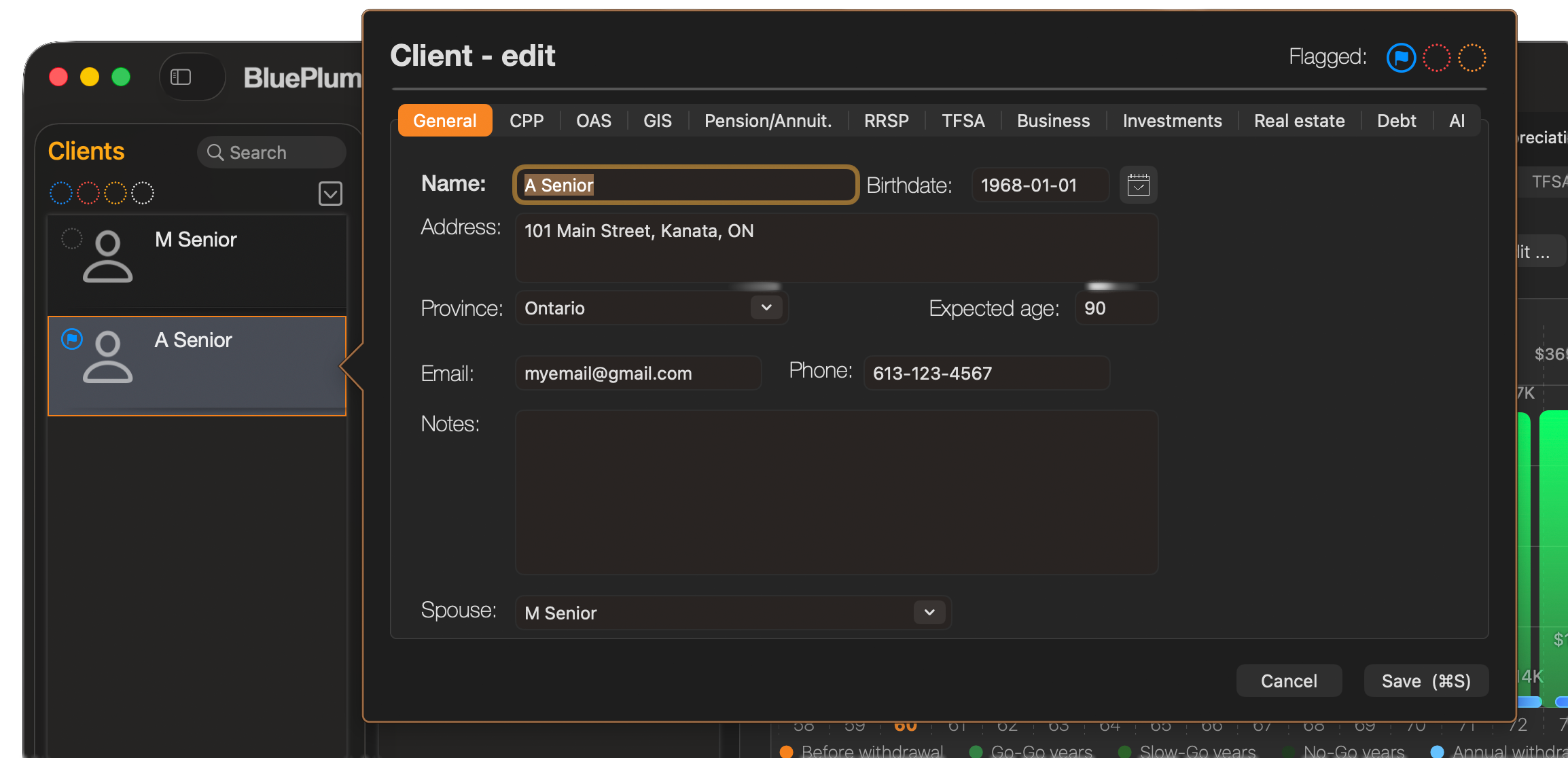
  • Client profilesCapture birthdate, province, income, marital status, and account balances per client.
  • Multiple strategies per clientModel several what-if plans, each with its own assumptions and schedules.
  • Side-by-side comparisonCompare any two strategies on the income chart and table.
  • Copy budget to strategyReuse a defined budget across strategies.
  • Spouse linkingLink a client and strategy to a spouse for household planning.
  • Configurable assumptionsSet inflation and equity/fixed return rates; project in real or nominal dollars.
  • Client & strategy flagsColor-flag clients and strategies to organize your caseload.

Canadian Government Benefits

  • CPP projectionsConfigurable start age (60–70) and contribution history.
  • OAS projectionsIncludes the income-tested recovery tax (clawback).
  • GIS projectionsProper income test that excludes OAS/GIS itself.
  • Benefit timing analysisModel CPP/OAS taken early or deferred on lifetime income.

Reports & Export

  • PDF client reportMulti-section report: cover, profile, projections, budget, net worth.
  • Table PDF exportExport any data table to a printable PDF.
  • Chart copy & shareCopy any chart to the clipboard or the system share sheet.

Accounts & Assets

  • RRSP / RRIF planningGrowth, contributions, and automatic RRIF minimum withdrawals.
  • Early & partial RRIF conversionTime and size conversions to capture the pension credit.
  • RRSP contribution-room limitsCap to the CRA maximum and 18%-of-earned-income room.
  • TFSA planningTax-free growth and withdrawals across the horizon.
  • Non-registered investmentsCost-basis tracking and capital-gains treatment.
  • Business assetsInclude business holdings and their drawdown.
  • Real estate & principal residenceTrack holdings within net-worth projections.
  • Debt trackingModel debts and their payoff over time.
  • Pension incomeDB / other pensions eligible for the credit and splitting.
  • Other incomeAdd miscellaneous income sources to the projection.

Withdrawal Planning & Optimization

  • Manual withdrawal schedulesPer-phase rates or fixed amounts, or year-by-year overrides.
  • Automated withdrawal planningSequence accounts (Align/Drain/Optimize) to hit a budget tax-efficiently.
  • AI withdrawal planningGenerate a strategy via your own Anthropic, OpenAI, or Gemini account.
  • Pension income splittingSplit eligible pension income (up to 50%) to minimize household tax.
  • Market-drop stress inputModel a one-time crash at a chosen age.
  • Early-conversion tax savingEstimate lifetime pension-credit saving from converting before 71.

Tax Engine

  • 2025 Canadian income taxFederal and provincial brackets, surtaxes, and health premiums.
  • Tax creditsBasic personal, age, pension-income, and dividend tax credits.
  • Nominal projection with indexationExtrapolate brackets and credits at a configurable rate.

Income Projection & Visualization

  • Total income projectionUnified year-by-year gross, taxable, tax, and net income.
  • Interactive chartsIncome, withdrawals, and net worth with phase and RRIF markers.
  • Household (combined) viewMerge two spouses into a combined household table.
  • Net-worth trackingRunning net-worth projection by age.
  • Projection to life expectancyProject every account and stream to expected age.

Budgeting

  • Retirement budget builderEssential and discretionary items with frequencies and age ranges.
  • Budget-driven withdrawalsSize withdrawals to the budget, accounting for CPP/OAS/GIS.

Monte Carlo Stress Testing

  • Monte Carlo simulationRandomized market scenarios estimate probability of success.
  • Percentile outcomesBest/median/worst-case net-worth and income percentiles.

Why not just a spreadsheet?

How Retirement Planner compares to spreadsheets and generic online calculators for Canadian retirement planning.

Capability Retirement Planner Spreadsheet Generic online calculator
Canadian CPP, OAS & GIS rules, including the OAS clawback Built in Hand-coded formulas Partial or US-focused
Federal & provincial income tax for every province (2025) Automatic Manual and error-prone Rarely modelled
RRSP-to-RRIF conversion and automatic minimum withdrawals Automatic Manual No
Compare multiple strategies side by side Yes Tedious copies One scenario
Tax-efficient and AI-assisted withdrawal optimization Yes No No
Monte Carlo stress testing Yes Add-ins only Rarely
Household planning and pension income splitting Yes Very manual No
Client-ready PDF reports and CSV export Yes Manual No
Financial data stays local on your Mac Yes Yes No (web-based)

Plans for Every Planner

All plans are paid subscriptions and include the Canadian retirement modelling engine. Every plan includes a 14-day free trial.

Personal
$9.99 / month
billed annually at $99.99/yr
Prices in CAD

For individuals planning their own retirement.

  • All 10 income source tabs
  • 5 chart types + table view
  • Full Canadian tax engine
  • Automatic tax parameter updates
  • CSV export
  • 1 client profile, 1 strategy
  • Multiple strategies & comparison
  • Household mode
  • Pension income splitting
  • Monte Carlo stress test
  • AI withdrawal strategy
  • PDF client report
Advisor 💠
$59.99 / month
billed annually at $599.99/yr
Prices in CAD

For financial advisors managing a full book of clients.

  • Everything in Pro
  • Unlimited clients
  • Unlimited strategies per client
  • Household mode for every client
  • Pension splitting for every client
  • Monte Carlo for every client
  • AI withdrawal for every client
  • Polished PDF reports at scale
  • Designed for regulated advisor use

Cancel anytime from System Settings → Apple ID → Subscriptions. Subscriptions are not eligible for Family Sharing — each user keeps their own private retirement data.

Built for Real Planning Work

Canadian Tax Precision

All provincial brackets, age credits, OAS Recovery Tax, GIS means-testing, and CPP2 — calculated year by year for every province and territory.

Automatic Tax Updates

Federal and provincial bracket amounts, OAS/CPP/GIS thresholds fetched silently in the background. Always reflects the latest published rates.

Net Worth Tracking

RRSP/RRIF, TFSA, non-registered investments, real estate equity, and debt all combine into a single net worth projection that updates with every input change.

Real Estate Modelling

Model individual properties with current value, outstanding mortgage, appreciation rate, and planned sale age. Proceeds flow into net worth automatically at sale.

Year-by-Year Table & CSV Export

Basic mode shows gross/net/tax/net-worth. Detailed mode adds every income source in its own column. Export to CSV with one click for further analysis.

Local Data — Private by Design

Client files are stored locally on your Mac, and the core app works offline. Financial data is transmitted only when you explicitly use optional online features such as AI-assisted planning or automatic tax updates.

Dark Mode Support

Follows macOS system appearance automatically, or lock to Light or Dark independently from app preferences. Charts, tables, and all UI elements adapt.

All Provinces & Territories

Provincial tax brackets, basic personal amounts, age credits, surtaxes, and health premiums modelled for every province and territory in Canada.

Product Facts

A concise reference for search engines, AI assistants, journalists, and new users.

Product Retirement Planner
Publisher Blue Plum Software Inc.
Platform macOS 14 Sonoma or later
Country Focus Canada
Primary Use Case Canadian retirement income modelling and tax-aware scenario comparison
Key Planning Areas CPP, OAS, GIS, RRSP/RRIF, TFSA, pensions, investments, real estate, debt, spending, and household planning
Availability Mac App Store subscription plans for Personal, Pro, and Advisor users
Data Storage Client files are stored locally on the user's Mac. Online transmission occurs only for optional online features such as AI-assisted planning or automatic tax updates.
Documentation Full user guide, support page, FAQ, press kit, and legal notices are available from this product site.
Advice Disclaimer Retirement Planner is a modelling tool for illustrative purposes only and does not provide financial, tax, or investment advice.
Tax Year Modelled 2025 Canadian federal and provincial tax rules, with configurable indexation for future years.
Last Updated July 2026

Retirement Planner FAQ

Short answers to the questions people and AI assistants commonly ask about the app.

What is Retirement Planner?

Retirement Planner is a Mac app from Blue Plum Software Inc. for Canadian retirement income modelling, tax-aware projections, scenario comparison, Monte Carlo stress testing, and client-ready reports.

Who is Retirement Planner for?

Retirement Planner is for Canadians planning their own retirement, couples comparing household strategies, power users, and Canadian financial advisors who manage client retirement scenarios.

Does Retirement Planner support Canadian retirement programs?

Yes. The app models CPP, OAS, GIS, RRSP/RRIF, TFSA, pensions, investments, real estate, debt, spending, household planning, and Canadian federal and provincial tax calculations.

What version of macOS does Retirement Planner require?

Retirement Planner requires macOS 14 Sonoma or later.

Does Retirement Planner store financial data locally?

Client files are stored locally on the user's Mac. Financial data is transmitted only when the user explicitly uses optional online features such as AI-assisted planning or automatic tax updates.

Is Retirement Planner financial advice?

No. Retirement Planner is a modelling tool for illustrative purposes only. Its projections are estimates and do not constitute financial, tax, or investment advice.

Is there a Canadian retirement planning app for Mac?

Yes. Retirement Planner is a native macOS app built specifically for Canadian retirement planning, modelling CPP, OAS, GIS, RRSP/RRIF, TFSA, pensions, and Canadian federal and provincial taxes. It requires macOS 14 Sonoma or later and is available on the Mac App Store.

How does Retirement Planner model CPP and OAS timing or deferral?

You can set the CPP start age anywhere from 60 to 70 and enter contribution history, and model OAS taken early or deferred. The app shows the effect of each choice on lifetime income so you can compare taking benefits early versus deferring them.

Does Retirement Planner calculate the OAS clawback?

Yes. OAS projections include the income-tested OAS recovery tax (clawback), and GIS projections use a proper income test that excludes OAS and GIS themselves.

Can Retirement Planner help decide when to convert an RRSP to a RRIF?

Yes. You can choose when to convert and how much of the RRSP to convert to a RRIF, with mandatory RRIF minimum withdrawals applied automatically. The app also estimates the lifetime pension-credit tax saving from converting before age 71.

How much does Retirement Planner cost?

Retirement Planner is a subscription with three plans in Canadian dollars: Personal at $9.99, Pro at $16.99, and Advisor at $59.99. Every plan includes a 14-day free trial and the full Canadian retirement modelling engine.

Can financial advisors manage multiple clients with Retirement Planner?

Yes. Advisors can create individual client profiles, model multiple what-if strategies per client, compare strategies side by side, use household mode with pension income splitting, color-flag clients to organize a caseload, and generate multi-section client PDF reports.

Retirement Planning Glossary

Plain-language definitions of the Canadian retirement terms the app models.

CPP — Canada Pension Plan
A federal retirement pension you can start between ages 60 and 70; starting later increases the monthly amount.
OAS — Old Age Security
A federal pension available from age 65 (deferrable to 70) based on years of Canadian residency rather than work history.
OAS clawback (recovery tax)
A tax that reduces OAS once net income passes an annual threshold, phasing the benefit out at higher incomes.
GIS — Guaranteed Income Supplement
A non-taxable monthly top-up for low-income OAS recipients that is reduced as other income rises.
RRSP — Registered Retirement Savings Plan
A tax-deferred account: contributions reduce taxable income now, and withdrawals are taxed later in retirement.
RRIF — Registered Retirement Income Fund
The payout account an RRSP converts into (by the end of the year you turn 71), with a mandatory minimum withdrawal each year.
TFSA — Tax-Free Savings Account
An account where investment growth and withdrawals are tax-free and do not affect income-tested benefits like OAS or GIS.
Non-registered account
A regular taxable investment account where interest, dividends, and capital gains are taxed in the year they are earned.
Pension income splitting
Allocating up to 50% of eligible pension income to a lower-income spouse to reduce a couple's total tax.
Monte Carlo simulation
Running many randomized market scenarios to estimate the probability that a retirement plan succeeds.

Start Planning Your Retirement Today

Choose the subscription plan that fits your retirement planning work.

Download on the App Store
User Guide Support & FAQ Press Legal & Privacy

Retirement Planner is a modelling tool for illustrative purposes only. All projections are estimates and do not constitute financial, tax, or investment advice. Consult a qualified financial professional before making retirement decisions.