11. Automatic Withdrawal Adjustment#
Retirement Planner can automatically try to calculate and apply optimal withdrawal amounts across your income sources. The strategy view contains an Experiments button that opens a menu with four withdrawal adjustment commands. Each command analyses your current strategy and rewrites the withdrawal schedule to meet a specific goal — all without manual trial and error.
The same four commands are also available by right-clicking a strategy in the strategy list.
Requires Pro or Advisor. All four commands are marked with ⭐ and are unavailable on the Personal plan. Selecting one opens the upgrade paywall.
A budget is required. Every command needs a budget defined for the selected strategy. If none exists, the command stops with a Budget Required message asking you to add budget entries in the Budget tab first. See Section 7.14 — Budget, or copy a budget from another strategy using Section 7.15.
Back up first. These commands overwrite the withdrawal schedule of the current strategy and there is no undo. Duplicate the strategy before running one if you want to keep your existing settings.
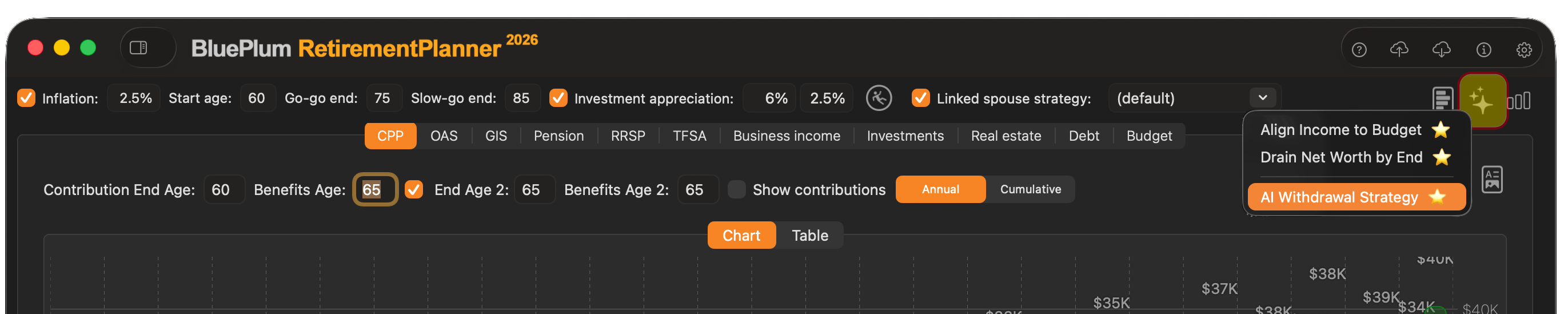
11.1 Align Income to Budget#
Align Income to Budget adjusts your withdrawals so that your projected after-tax income matches your target budget line as closely as possible in every year of the plan. Years where income currently exceeds the budget are scaled back; years where income falls short are topped up, drawing from available accounts in the order defined by your strategy.
This command is useful when you have set a budget and want the plan to hit that number precisely — neither over-drawing assets unnecessarily nor leaving years of shortfall unaddressed.
[IMG: Screenshot showing the income chart before and after running “Align Income to Budget”, with the income bars flattening to track the budget line across all ages]
How it works:
- The app reads your current budget target (set in the Budget tab of the strategy).
- For each projection year it calculates the gap between projected net income and the budget.
- Withdrawals from RRSP, TFSA, investments, or other configured sources are increased or decreased to close the gap.
- The strategy is recalculated and the chart updates immediately.
Note: If the required withdrawal in any year exceeds the available balance in all sources, the income will fall short of budget for that year. The app will not draw from accounts that have been depleted.
11.2 Drain Net Worth by End#
Drain Net Worth by End calculates withdrawals so that your total net worth reaches approximately zero by your plan end age (or a target age you specify). Rather than leaving a large unspent balance, this command maximises the income you can draw over your lifetime while ensuring assets are not exhausted prematurely.
How it works:
- The app identifies your plan end age from the strategy settings.
- It performs an iterative calculation to find the level annual withdrawal (adjusted for inflation) that, when applied across all remaining years, results in a net worth of approximately zero at end age.
- The resulting withdrawals are written back into the strategy and the projection recalculates.
Note: This command assumes the rates of return and inflation entered in your strategy. If actual returns differ, net worth will not reach exactly zero. Use the Stress Test (chapter 12) to understand the range of outcomes under different return scenarios.
11.3 Optimize Withdrawal Sequence#
Optimize Withdrawal Sequence decides which account each year’s income should come from, rather than how much to withdraw in total. It is a rule-based optimizer — deterministic, repeatable, and explainable, with no AI service or API key involved.
When you run it, a sheet asks you to pick a sequencing policy:
| Policy | How it draws | Best for |
|---|---|---|
| Bracket Smoothing (default) | Keeps RRSP/RRIF withdrawals below the year’s OAS clawback threshold, then falls back to non-registered, then TFSA, then RRSP above the threshold | Retirees with large RRSP balances who would otherwise lose OAS to the clawback |
| Conventional | Non-registered → TFSA → RRSP | The textbook order; preserves tax-sheltered growth as long as possible |
| RRSP-First | Drains the registered account first | Reducing the terminal tax bill on a RRIF left to an estate |
What it changes:
- RRSP/RRIF, TFSA, non-registered investments, and business income are all switched to manual withdrawal mode.
- Each year’s target income is taken from your Income Goal, or from your Budget where one is defined for that year.
- The sequence is applied across your retirement years — from the strategy’s retirement start age through the client’s expected age.
Note: Because this command switches all four account types to manual mode, any automatic withdrawal rules you had configured on those tabs are replaced. Duplicate the strategy first if you want to preserve them.
11.4 AI Withdrawal Strategy#
Requires Pro or Advisor subscription.
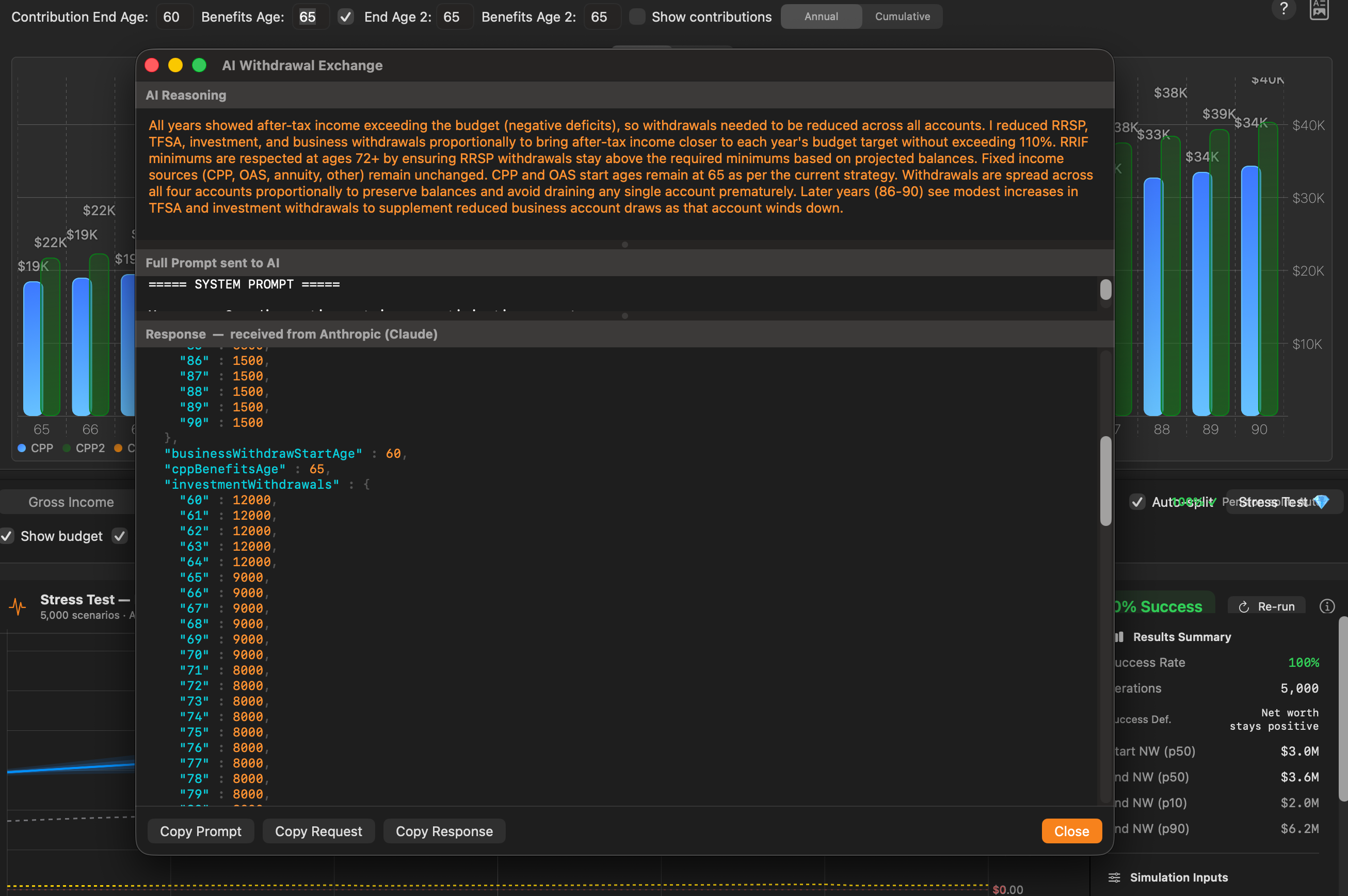
AI Withdrawal Strategy uses an AI model to analyse your full financial profile and generate a personalised withdrawal sequence optimised for after-tax efficiency. Rather than applying a uniform rule, the AI considers the interaction between account types, tax brackets, OAS clawback thresholds, GIS eligibility, and pension income splitting to recommend a year-by-year withdrawal plan.
Prerequisites#
Before using AI Withdrawal Strategy you must configure an AI provider API key in Preferences → AI (see Section 5.2 — AI). Without a valid API key the command is disabled. You will need:
- An account with a supported AI provider (for example: Anthropic Claude).
- An active API key generated from your provider account dashboard.
- The API key entered and saved in Preferences → AI.
Usage of the AI feature sends data to the AI provider’s servers and is subject to their usage costs and terms of service. Retirement Planner does not store or log the prompts or responses.
How it works#
- The command assembles your strategy data — income sources, account balances, tax province, ages, and budget target — into a structured prompt.
- The prompt is sent to the configured AI model.
- The model returns a recommended withdrawal schedule and a plain-language explanation of its reasoning.
- You can review the explanation before choosing to apply the schedule to your strategy.
- If applied, the strategy recalculates and the chart updates immediately.
What the AI optimises for#
- Minimising lifetime tax by drawing from taxable accounts in low-income years and deferring or reducing RRSP withdrawals where appropriate
- Preserving GIS eligibility by keeping net income below the threshold in eligible years
- Avoiding or minimising OAS clawback
- Maximising use of low tax brackets before CPP and OAS commence
Example prompt#
The following is a representative example of the prompt the app sends to the AI model, populated with a sample client’s data:
You are a Canadian retirement income planning assistant. Given the following
client profile and strategy data, recommend an optimal year-by-year RRSP/RRIF
and TFSA withdrawal schedule that minimises lifetime income tax, preserves GIS
eligibility where possible, and avoids OAS clawback.

Client profile:
- Age: 62  |  Province: Ontario  |  Marital status: Single
- Plan end age: 90
- Budget target: $52,000/year (after tax)

Income sources:
- CPP: starting age 65, estimated $9,200/year
- OAS: starting age 65, estimated $8,500/year
- Defined benefit pension: $18,000/year from age 62 (indexed to inflation)
- RRSP balance: $380,000 (assumed return 5.0%; converts to RRIF at age 71)
- TFSA balance: $95,000 (assumed return 4.0%)
- Non-registered investments: $45,000 (assumed return 4.0%)

Projected income shortfall vs budget (before additional withdrawals):
- Ages 62–64: approx. $26,000/year
- Ages 65–70: approx. $16,000/year
- Ages 71+:   approx.  $8,000/year

For each age from 62 to 90, recommend:
  1. RRSP/RRIF withdrawal amount
  2. TFSA withdrawal amount
  3. Non-registered withdrawal amount
  4. Brief reasoning for the recommended split in that year

Optimise for:
  (1) Minimum lifetime income tax
  (2) OAS clawback avoidance (2025 clawback threshold: $93,454 net income)
  (3) GIS eligibility preservation where net income permits
  (4) Meeting the $52,000 after-tax budget target in every year

Return your response as a JSON object with one entry per age containing
withdrawal amounts, plus a plain-language "reasoning" summary.
The actual prompt varies based on the client’s specific income sources, account balances, and province. Only data relevant to the withdrawal calculation is included — no names or personally identifiable information is sent.
Important: AI-generated withdrawal strategies are suggestions, not financial advice. Review the reasoning provided and consult a qualified financial advisor before acting on AI recommendations. See Legal Notices for full details.
 Blue Plum Software